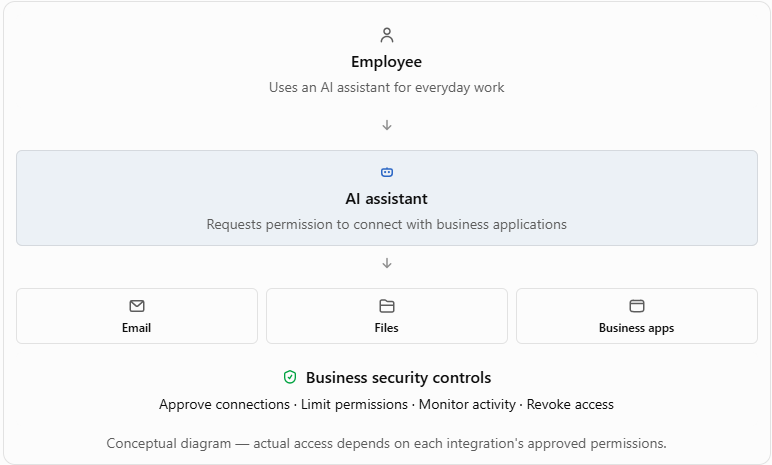
AI supply chain security means protecting your business from risks introduced by artificial intelligence tools, their connected applications, and outside services. An AI assistant may seem like just another productivity tool, but when it can access company email, files, customer records, or business systems, it becomes another connection that needs to be managed and protected.
The quick takeaway
- AI assistants can introduce security risks through connected apps and services.
- Employees may approve access without realizing how much information a tool can reach.
- Some AI tools can take actions, not just answer questions.
- Businesses should track approved AI tools, limit access, and know how to disconnect them.
- You don't need to stop using AI. You need to understand what you've connected it to.
Imagine an employee finds an AI tool that promises to organize their inbox, summarize customer conversations, and save hours of work.
Sounds helpful.
They sign in, approve a few permissions, and start using it. Nobody calls IT because it doesn't feel like installing a major new business system.
But what if that tool can now read company email, search shared documents, or send information to another service?
That's where the conversation changes.
The newest cybersecurity concern isn't always someone breaking into your network. Sometimes it's software your company willingly lets in.
Why are AI tools becoming a new business security risk?
AI tools are becoming part of everyday business operations, often faster than companies can review them. The risk increases when an assistant is allowed to connect with business applications, access sensitive information, or perform tasks on an employee's behalf.
We've spent years teaching businesses to be careful about software vendors.
Before giving a provider access to company systems, you want to know who they are, what they can access, and how that access is protected.
AI deserves the same attention.
The difference is that AI tools can look harmless. They may appear as a browser extension, meeting assistant, document helper, or an extra feature inside software employees already use.
One click can connect that tool to information your business has spent years protecting.
What exactly is the AI supply chain?
The AI supply chain includes the technology companies, models, connected services, plugins, data sources, and automated tools that work together to provide an AI service.
You might see one AI assistant on your screen, but that assistant may rely on several systems behind the scenes.
For example, a business might use an AI assistant that connects to:
- Microsoft 365 email and calendars
- SharePoint or cloud file storage
- Customer relationship management software
- Accounting or reporting applications
- Outside tools that retrieve information or perform actions
Some integrations use a technology called the Model Context Protocol (MCP), which helps AI applications communicate with external tools and information sources.
You don't need to remember that acronym.
What matters is this: the more systems an AI tool can reach, the more carefully its permissions should be reviewed.
Can an AI assistant actually do something harmful?
Yes, depending on its permissions and how it is designed. Some AI assistants can do much more than summarize a document or answer a question. They may be able to retrieve files, modify information, send messages, or trigger automated workflows.
That creates a new kind of security challenge.
A malicious instruction might be hidden inside a webpage, document, email, or response from a connected service. If the AI assistant treats that outside content as an instruction instead of untrusted information, it could take an action the user never intended.
Security professionals call this prompt injection.
Here's an easy way to understand it.
Imagine you ask an assistant to read a customer document and summarize it. Hidden inside the document is an instruction telling the assistant to retrieve other company information and send it somewhere else.
A properly secured system should not obey that instruction.
But if an AI tool is poorly designed, has excessive permissions, or lacks adequate safeguards, the consequences can be serious.
The concern isn't that AI has bad intentions. It's that software with legitimate access can sometimes be manipulated into doing the wrong thing.
Why might traditional cybersecurity tools miss this problem?
Traditional security controls often focus on unauthorized access, malware, suspicious logins, and attempts to break into systems. AI integrations create an additional challenge because the connection itself may be authorized.
Consider an employee who signs into a legitimate AI application using their company account.
The login succeeds.
The application receives permission to access selected business information.
From the outside, that activity may look completely normal.
But did anyone review the application? Does it need every permission it requested? Can it share information with other services? Who is responsible for disconnecting it?
Those are questions antivirus software alone cannot answer.
This is why AI security needs to include vendor oversight, identity protection, access management, and employee awareness.
What could this look like in a real business?
Consider a fictional 25-person professional services company. An employee connects an AI meeting assistant to their company account. The tool promises to record meeting notes, organize follow-ups, and prepare customer summaries. The employee is trying to save time. Nothing about that decision seems unusual. A few weeks later, management discovers the tool has access to more information than expected, including calendars and files unrelated to the employee's work. There is no evidence of a breach. But the business now has questions it should have asked before the connection was approved.
Who owns the account?
Where is the information processed?
Can the provider retain it?
How quickly can access be revoked?
Are there other AI tools connected in the same way?
This example illustrates a common business risk: you can have a security exposure without knowing that a security incident has occurred.
How can businesses use AI without creating unnecessary risk?
The goal isn't to ban AI. It's to make sure employees can benefit from it without exposing company information or giving outside tools more access than they need.
Start with a few practical controls.
| What to check |
Why it matters |
| Approved AI applications |
Know which tools employees use for business |
| Connected accounts | Understand which systems an AI tool can reach |
| Application permissions | Limit access to what the tool actually needs |
| Sensitive information | Decide what employees may share with AI services |
| Vendor security practices | Review how providers handle and protect information |
| Activity records | Make it easier to investigate unexpected actions |
| Access removal | Ensure connections can be disable quickly |
What should business owners ask their IT provider?
You don't need to understand every AI model or integration to ask the right questions. Your IT provider should help identify connected applications, review permissions, and establish a manageable approval process.
Start with these five:
- Which AI tools are employees currently using?
- What company data and applications can those tools access?
- Who approves new AI connections?
- Can we see what those connections are doing?
- How quickly can we shut off access if something goes wrong?
The fifth question is especially important.
Disconnecting a tool should be more than clicking a button and hoping the connection disappears. Your IT team should understand whether access tokens, active sessions, stored data, and other connections also need attention.
Does Microsoft 365 make AI tools automatically safe?
No. Microsoft 365 provides security and identity-management capabilities, but a business still needs to manage which third-party applications can connect to its environment.
For example, employees may encounter applications that request access to their Microsoft account, email, calendar, or files.
Some requests may be appropriate.
Others may ask for more access than the business wants to allow.
Microsoft Entra includes controls for managing application consent and permissions. These can help organizations establish who is allowed to approve certain connections.
The important lesson is that using a trusted business platform doesn't automatically make every connected application trustworthy.
What are the benefits of getting AI security right?
Good AI governance isn't just about preventing problems. It can help employees use approved tools more confidently and help management make better decisions about technology investments.
When a business knows what its AI tools can access, it becomes easier to:
- Protect customer and company information.
- Reduce unnecessary application permissions.
- Identify duplicate or unapproved software.
- Respond faster when a vendor reports a security issue.
- Support responsible AI adoption.
- Build confidence with customers and business partners.
The best outcome isn't a company where everyone is afraid to use AI.
It's a company where people know which tools are approved, what information is appropriate to share, and who to contact when they have questions.
Is your business overlooking an AI vendor?
For years, businesses have paid attention to their internet providers, backup vendors, software platforms, and cybersecurity services. Now there's another category to include in that conversation. The AI assistant that writes emails. The meeting tool that summarizes conversations. The application that connects to customer records. The automated agent that completes tasks in the background. These tools can create real value. But they shouldn't receive unrestricted access simply because they're convenient. Before connecting another AI application, ask one simple question: Do we know what we're giving it permission to do?
At LBT Technology Group, LLC., we believe technology should make business easier without creating risks nobody understands.
If your organization is adopting AI tools and isn't sure which applications have access to company information, contact LBT Technology Group to discuss an AI application and security-access review.
The right time to understand those connections are before you need to disconnect one.
Frequently Asked Questions
What is AI supply chain security?
AI supply chain security means reviewing and protecting the outside tools, services, integrations, and automated systems involved in using artificial intelligence. For a business, that includes understanding which AI applications employees use, what information those applications can access, and how to remove access when a tool is no longer approved.
Can AI tools access confidential company information?
Yes, some can, depending on their features and permissions. For example, a connected application may receive authorization to read emails, access files, or interact with business systems. The exact access depends on what the application requests and what the user or administrator approves.
Should businesses ban employees from using AI?
Not necessarily. A better starting point is establishing approved tools, clear data-sharing rules, and a process for reviewing new applications. That lets employees benefit from AI while reducing unnecessary exposure. Businesses should also train staff to recognize requests for broad access to sensitive information.
How can Microsoft 365 administrators control AI integrations?
Microsoft Entra administrators can manage application consent policies and configure an approval workflow for applications requiring administrator consent. They can review requested permissions before approval, helping prevent unnecessary access to company information. The appropriate configuration depends on the organization's needs.
How often should businesses review AI applications?
A quarterly review is a reasonable starting practice for many small businesses, with additional reviews whenever new integrations are introduced or employees change roles. Higher-risk connections may need more frequent monitoring. The review should confirm ownership, permissions, business purpose, activity visibility, and the ability to revoke access.
Additional Resources & Reading